Teach Your Mac to Spell: Whisper Dictation With a Glossary
macOS Dictation cannot learn a word. Glossa puts Whisper on the dictation key, prompted with your glossary and cursor context, so names come out right.
Apple's dictation turns "vLLM on megamaschine" into "VLLM on Megamachine" every single time, and there is no way to teach it a word. Whisper can be taught: it takes a short prompt before the audio, and whatever is in that prompt shapes how it spells what follows. I built Glossa, a macOS menu-bar app that takes over the dictation key, sends your voice to a Whisper server with your glossary and the text before your cursor as the prompt, and types the result. From the first benchmark to a notarized public release took about half an hour in one Claude Code session.
I dictate a lot. Prompts for Claude Code, Slack messages, the odd email. Most of it is full of names that only exist in my world: hostnames, product names, the model behind an alias.
macOS Dictation handles the English fine. It just cannot spell any of my words.
So I asked Claude Code to explore replacing it, and the exploration turned into a release before dinner.
Table of Contents
- The problem is not accuracy
- Whisper listens to a prompt
- What Glossa does
- The dictation key is not what I thought
- Half an hour from benchmark to release
- What I got wrong
- Install it
The problem is not accuracy
Say this sentence to macOS Dictation: restart the vLLM container on megamaschine and point llm-router at sparkmaschine, then check the Tailscale MagicDNS entry for supermaschine.
You get back: Please restart the VLLM container on Megamachine and point the LLM router at Spark Machine. Then check the TailScale Magic DNS entry for SuperMachine.
Every word is a reasonable guess. Every one is wrong. The transcription has a word error rate of zero, if you count phonetically, and I still have to fix seven things before I can send it.
Apple's dictation has no vocabulary setting. Third-party apps like Superwhisper and VoiceInk have a dictionary, which helps, but none of them know what sentence I was in the middle of.
Whisper listens to a prompt
OpenAI's Whisper has a feature the dictation apps mostly use for one thing: an initial prompt. It is a short piece of text the model sees before the audio, as if it were the transcript so far. The model continues it.
Put vocabulary in the prompt and the words come out spelled that way. Put the previous sentence in and the model keeps the register, the punctuation style and the capitalization of what you were writing.
I ran the same synthetic sentence through whisper.cpp on my MacBook, with the large-v3-turbo model, before building anything:
No prompt:    Please restart the VLLM container on Megamachine and point the LLM router at Spark Machine. Then check the TailScale Magic DNS entry for SuperMachine.
With prompt:  Please restart the vLLM container on megamaschine and point the LLM router at sparkmaschine. Then check the Tailscale MagicDNS entry for supermaschine.
The prompt was one line: Terms: vLLM, megamaschine, sparkmaschine, supermaschine, llm-router, Tailscale, MagicDNS. Every term came out exactly right, and the call took about a second on the laptop alone. That settled the question of whether to build it.
What Glossa does

Glossa is a menu-bar app, about 600 lines of Swift, no Xcode project.
- Press the microphone key on your keyboard to start, press it again to stop, or hold it to talk. Fn double-tap and Fn hold work too. Nothing about how you dictate changes.
- Before it records, it reads your glossary, a text file with one term per line, and asks the app you are in for the text before your cursor through the Accessibility API. Both go into Whisper's prompt, glossary first, context last, so the context survives when the prompt is too long.
- The audio goes to a Whisper server as one HTTP request. By default that is whisper.cpp's
whisper-serveron your own Mac, kept warm as a launch agent. It can be any OpenAI-compatible transcription endpoint on your network instead. - The result is pasted where you were, and whatever was on your clipboard is put back.
- If music is playing when you start, the volume drops by ten points while you talk and comes back when you stop.
Nothing leaves the machine unless you point it somewhere else. The server is a 550 MB model file and one process.
Whisper does not stream, so there is no live text while you speak. Every "real-time" Whisper app re-transcribes the audio so far every second or two and shows interim text in a floating window. That is on the list; the paste at the end would stay the same.
The dictation key is not what I thought
The one thing I wanted was to keep the key I already press. On a MacBook that is the microphone key, F5, and macOS claims it: with Dictation turned off, pressing it shows a dialog asking whether you want to turn Dictation on.
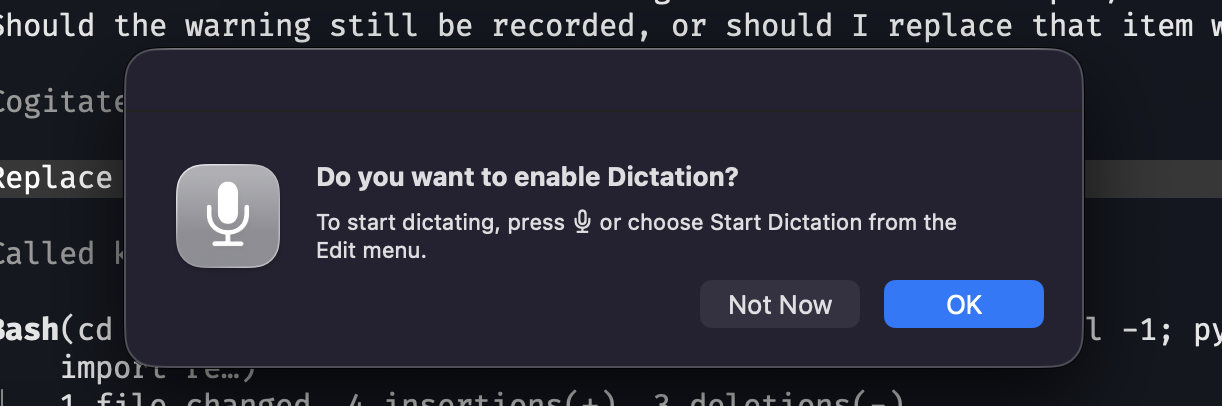
I assumed the key was a media key, like volume and brightness, which arrive as system-defined events. It is not. It arrives at a CGEvent tap as an ordinary key press, virtual key code 176, with the Fn modifier flag set. Nothing documents that; the app logged every event and I pressed the key.
An active event tap can swallow an event by returning nothing. Glossa swallows that one key, so macOS never sees it and the dialog never appears. Press and release toggles, hold is push-to-talk, and because the tap sees the key going down and up, both work from the same handler.
The Accessibility permission that makes the tap possible is the same one that lets Glossa read the text before your cursor and paste the result. One grant, three uses.
Half an hour from benchmark to release
The session started with "let's explore this small project". It ended with a notarized universal build on GitHub.
In between, in one Claude Code session: the benchmark above, a short survey of existing apps, the Swift app with its event tap, recorder, prompt builder and paste, a launch agent for the server, a signed bundle so macOS permissions survive rebuilds, a README, changelog and release pipeline matching Smart Terminal, and the repo, release and tools-page entry. Version 0.2.0 followed twenty minutes later with music ducking and a Homebrew cask.
My part was the same as with wims and Smart Terminal: say what it should be, press the keys, and report what happened. The agent cannot press my microphone key. Every hotkey test was me, and the log it wrote was how it found out what I saw.
What I got wrong
The Accessibility prompt is not a prompt. I told Claude I had granted the permission. I had granted the microphone. Accessibility is a toggle in System Settings that the dialog only points at, and the app sat waiting until the agent read the permission database and noticed.
Renaming the app revoked everything. Dictate became Glossa, which meant a new bundle identifier, which macOS treats as a new app. My dictated bug report, "we lost the shortcut override when updating to Glossa", is in the log, transcribed correctly.
The debug log recorded my typing. Logging every key event to find the microphone key also logged the key codes of the message I typed afterwards. The log now only records keys with codes of 96 and up, the F-keys and special keys, and that first log was deleted.
Auto-detecting the language costs half a second. The first real dictations took 1.5 to 1.9 seconds for two-second clips, slower than the benchmark. Language detection is an extra encoder pass. Fixing it to English brought a sentence down to about 0.6 seconds, and the glossary prompt costs almost nothing.
Homebrew asks you to trust a tap. The first brew install from the new tap stopped at a prompt the output filter hid, and I spent a minute wondering why nothing was installed.
Install it
brew install --cask pluginslab/tap/glossa
glossa-server
The cask installs the app and whisper.cpp; glossa-server downloads the model and starts the launch agent. There is also a notarized DMG for macOS 14 or later, with the same server script inside the app.
Then grant Accessibility and Microphone, and in System Settings → Keyboard set "Press Globe key to" to Do Nothing and the Dictation shortcut to Off, so Apple's dictation stops answering the key.
Your glossary is at ~/.config/glossa/glossary.txt. Put in it whatever Whisper gets wrong, and edit it whenever you catch a new one; it is read on every dictation.
Glossa is MIT licensed and the code is on GitHub. It makes one network request per dictation, to the server you configured.
If your Mac has been writing "Megamachine" for a year, this is the fix.
Links: Glossa on GitHub · whisper.cpp · Whisper prompting · Smart Terminal · wims
Tags: macOS, Whisper, Dictation, Developer Tools