Which Tab Was That? Tab Groups for Claude Code on macOS
Five Claude Code sessions, five tabs that all say zsh. Smart Terminal adds tab groups, Claude-aware tabs and alerts to a Terminal.app-style macOS terminal.
Running five Claude Code sessions in Terminal.app means five tabs that all say zsh, and no way to tell which one has been waiting on you for twenty minutes. I built Smart Terminal, a native macOS terminal that keeps everything I like about Terminal.app and adds Chrome-style tab groups, tabs that name themselves after the Claude session inside them, and a notification when one needs you. It went from an empty folder to a notarized public release in about two hours.
It was a normal afternoon: five Claude Code sessions open at once. A couple on client work, a couple on documents, and one on a WordPress plugin.
Every tab in the strip said zsh.
Somewhere in there, a session had finished twenty minutes earlier and was sitting on a question. I found it by clicking through the tabs one at a time.
Table of Contents
- Tabs alone do not fix it
- What Smart Terminal does
- Tabs that know Claude is in them
- Claude Code already writes it down
- Bringing your Terminal.app tabs over
- Built in an afternoon, with Claude Code
- What I got wrong
- Install it
Tabs alone do not fix it
Terminal.app is a good terminal. I have used it for years, with a profile I tuned once and never touched again. Its tabs, though, are just a row of shell names.
Browsers solved this a while ago. Chrome lets you gather tabs into a named, colored group and collapse it when you are not looking at it. Terminal.app has something called window groups, but those are saved layouts, not groups you work in.
I looked for a native macOS terminal with real tab groups and did not find one. The closest thing, TabTerm, gets there by running terminals inside Chrome to borrow Chrome's groups. That is clever, and it told me the gap was real.
Naming alone would not have solved it either. My problem was not only "which tab is the API one". It was "which of these Claude sessions is waiting for me".
What Smart Terminal does
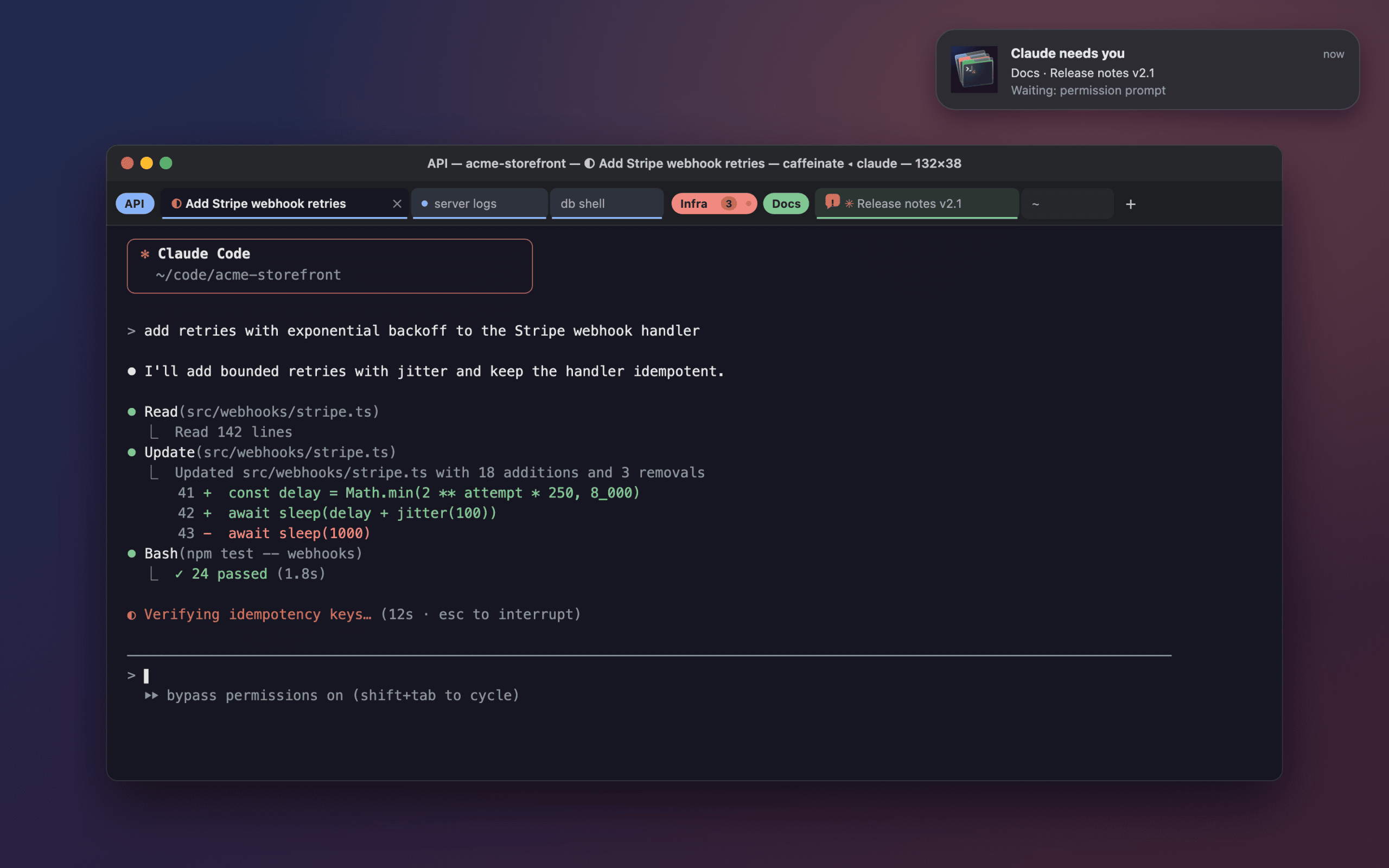
- Rename any tab, and gather tabs into named groups in Chrome's nine colors. Click a group's chip to collapse it down to a count.
- Where you drop a tab decides its group: between two tabs of a group, it joins. Drag a chip to move the whole group, into another window, or out onto the desktop to make a new one.
- It still feels like Terminal.app. It reads your default Terminal.app profile, including font, colors and translucency, and the title bar shows the same live details: folder, program title, running command and window size.
- A tab running Claude Code takes the session's name and shows whether Claude is working, idle or waiting on you.
- When a Claude you cannot see finishes or hits a permission prompt, you get a macOS notification, and the Dock badge counts how many are waiting.
- Tabs remember the Claude session they were running and offer to resume it after a restart, with the same flags.
Your layout survives a restart: windows, groups, colors, names and the folder each tab was in.
Tabs that know Claude is in them
A tab running Claude Code names itself after the session. It uses your /rename if you set one, otherwise the short title Claude writes for every session, otherwise "Claude · folder". "Add Stripe webhook retries" is a lot more useful than zsh.
The status lives in the tab too. While Claude works, the tab shows the same half moon that Claude animates in its own terminal title, ◐ and ◑. When it goes idle, you get ✳. When it is blocked on a permission prompt, an orange speech bubble appears.
If you rename the tab yourself, your name wins, but the live status stays in front of it.
The notification only fires for tabs you cannot see: the app is in the background, or it is another tab. Click it and you land in that tab. That notification is the reason I started this.
Claude Code already writes it down
As with wims, most of the work was already done by Claude Code. It just was not visible.
Every running Claude process writes a small file to ~/.claude/sessions/, named after its process id:
{"pid":25965,"sessionId":"9b4e…","cwd":"/Users/me/code/api","status":"busy", …}The status is busy, idle or waiting, and when it is waiting there is a waitingFor field that says why, for example permission prompt. The terminal title Claude sets does not tell you that, which is exactly the state I care about most.
The process id is the useful part. A terminal already knows which process group is in the foreground of each tab, and for a Claude tab, that is the Claude process. So detection is exact, without reading the screen or touching your shell config.
You can look at your own right now:
cat ~/.claude/sessions/*.jsonThe name comes from the session transcript, where Claude appends ai-title, custom-title, last-prompt and pr-link entries. Transcripts get big, so Smart Terminal reads backwards from the end until it finds a title, and after that only reads new bytes.
One more thing I found in Claude's source while building this. Claude Code can send its own notifications to the terminal, but it picks the method based on which terminal it detects. For any terminal it does not recognize, it sends nothing at all. Reading the session file gets around that without asking you to change a setting.
Bringing your Terminal.app tabs over
Switching terminals is painful when you have a dozen sessions open. So there is Shell → Import Tabs from Terminal.app…
It lists your open Terminal.app tabs, grouped by project folder, with a checkbox each:
- Claude sessions are handed over. Smart Terminal types
/exitinto the session in Terminal.app, waits for it to stop, then resumes it withclaude --resumeand the same flags. A session never runs in two places at once. - tmux sessions are re-attached here, and Terminal.app's client is detached. Nothing inside tmux restarts.
- Plain shells reopen in the same folder.
Sessions that are busy start unchecked, because handing one over stops it mid-turn. That default matters more than it sounds: the Claude session building this feature was itself in the list.
Built in an afternoon, with Claude Code
I started with an empty folder at 14:21. The notarized v0.5.0 was public on GitHub at 16:20.
In between, working in one Claude Code session: a tested core model for tabs and groups, the Swift app on top of SwiftTerm, everything above, and a release pipeline that signs, notarizes and packages a universal DMG. The result is about 4,500 lines of Swift and 52 tests, including a randomized one that throws 8,000 tab and group operations at two windows and checks nothing gets lost.
My job was the same as with the WordPress work I have written about: decide what it should be, test it with my hands, and say no when something felt wrong.
The most useful trick was giving the agent eyes. It could not take screenshots on my Mac, so it built a small debug channel into development builds. That channel can open tabs, type into them, rename and group them, and render the window to a PNG from inside the app. From then on it checked its own work visually before telling me it was done.
What I got wrong
A few things, and most were only caught by running the app.
Moving a tab to a new window crashed. The code read the layout while it was in the middle of changing it, and Swift's exclusivity checks stopped the app. The unit tests never crossed that path. The debug channel did, on its first try.
tab means two things in AppleScript. The import scan came back empty. Inside tell application "Terminal", the word tab refers to Terminal's tab object, not the tab character I was using to separate fields.
A bug that was not a bug. The first finished Claude turn after launch never showed as needing attention. Later ones did. After adding a log of every change, the answer was mundane: I had clicked the notification, which is supposed to clear it.
The process name is a version number. The tab titles briefly read my-project · 2.1.281, because Claude's binary lives in a versioned folder and that is what the system reports as its name. Detection goes through the session file instead.
Install it
Download the DMG from the releases page, open it, and drag Smart Terminal to Applications. It is a signed and notarized universal build and needs macOS 26 (Tahoe) or later.
There are limits. Claude running inside tmux is not detected yet, because the tab only sees the tmux client. macOS uses ⌃← and ⌃→ for switching Spaces by default, so moving a tab within its group has an ⌃⌥ alternative. There are no automatic updates yet.
Smart Terminal is MIT licensed and the code is on GitHub. It makes no network requests.
If your terminal tabs all say zsh and one of them has been waiting on you, you now know which one.
Links: Smart Terminal on GitHub · wims · Claude Code docs · SwiftTerm
Tags: Claude Code, macOS, Terminal, Developer Tools